Know what to say
Turn your offer into a clear message so customers can see who you help, what you do and how to enquire.
Try the free message planner
YOUR BUSINESS. A CLEARER NEXT STEP.
PorridgeWeb helps you work out what your website needs to do, find a design that fits and build something you can take into the world. Start small. Keep the useful bits. Make it yours.
Free tools and previews need no payment. Paid plans are for one website, with monthly allowances. Hosting, domains and business email are separate.
Turn your offer into a clear message so customers can see who you help, what you do and how to enquire.
Try the free message plannerPreview designs before you pay, then customise the colours, type, images and layout within your plan.
Find your starting designBuild and download the static website files, keep a backup and follow the deployment guide for your chosen host.
See how downloads workMADE BY DIGITHAT, IN AUSTRALIA
Created by Robin Custance at DigiThat, PorridgeWeb brings website planning, design tools and practical learning into one workshop for small businesses, independent professionals and makers.
You bring the knowledge of your business. The tools help you turn it into clear pages, consistent design and an obvious next step for your customers. You can explore first, choose a monthly plan when it suits you and keep lawfully exported websites under the supplied licence after membership ends.
It suits people happy to shape their own content and follow a deployment guide. If you want someone to design and build with you, explore DigiThat’s custom website services.
THREE STEPS. REAL WORKING TOOLS.
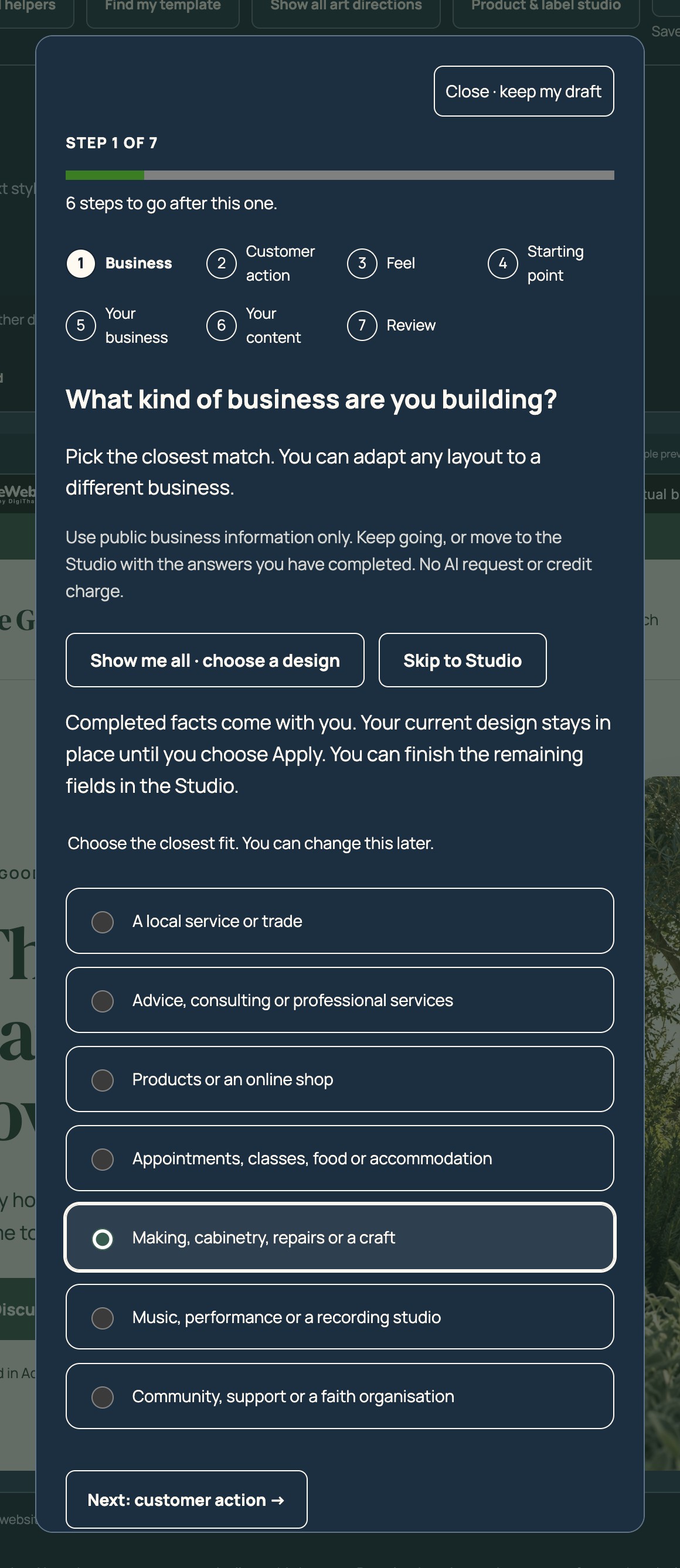
Browse the art directions or follow the numbered template finder. Keep the choices you have already made when you move into the studio.
Follow the setup steps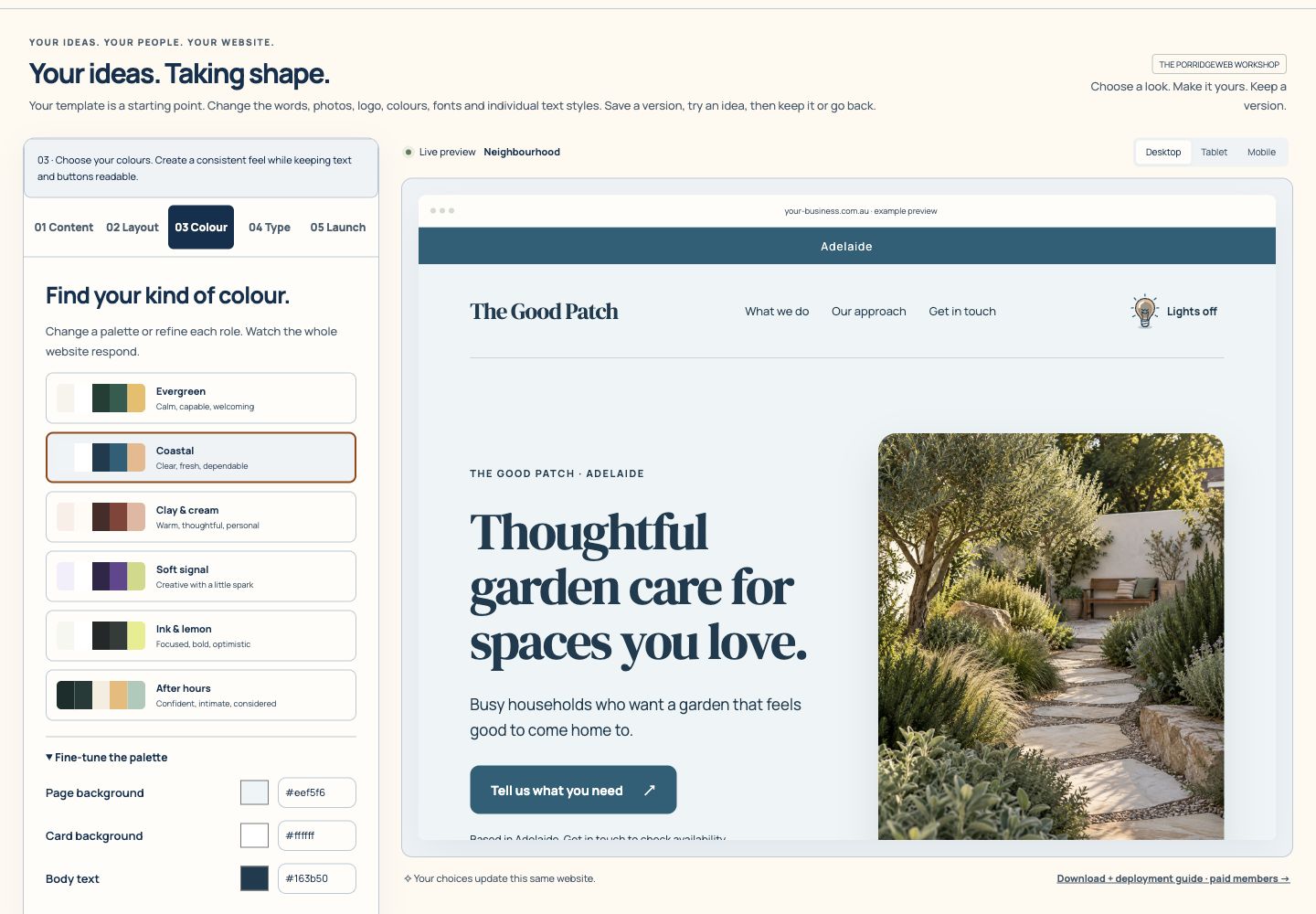
Adjust words, colours, fonts and images. Check the same site on Desktop, Tablet and Phone previews.
Follow the studio steps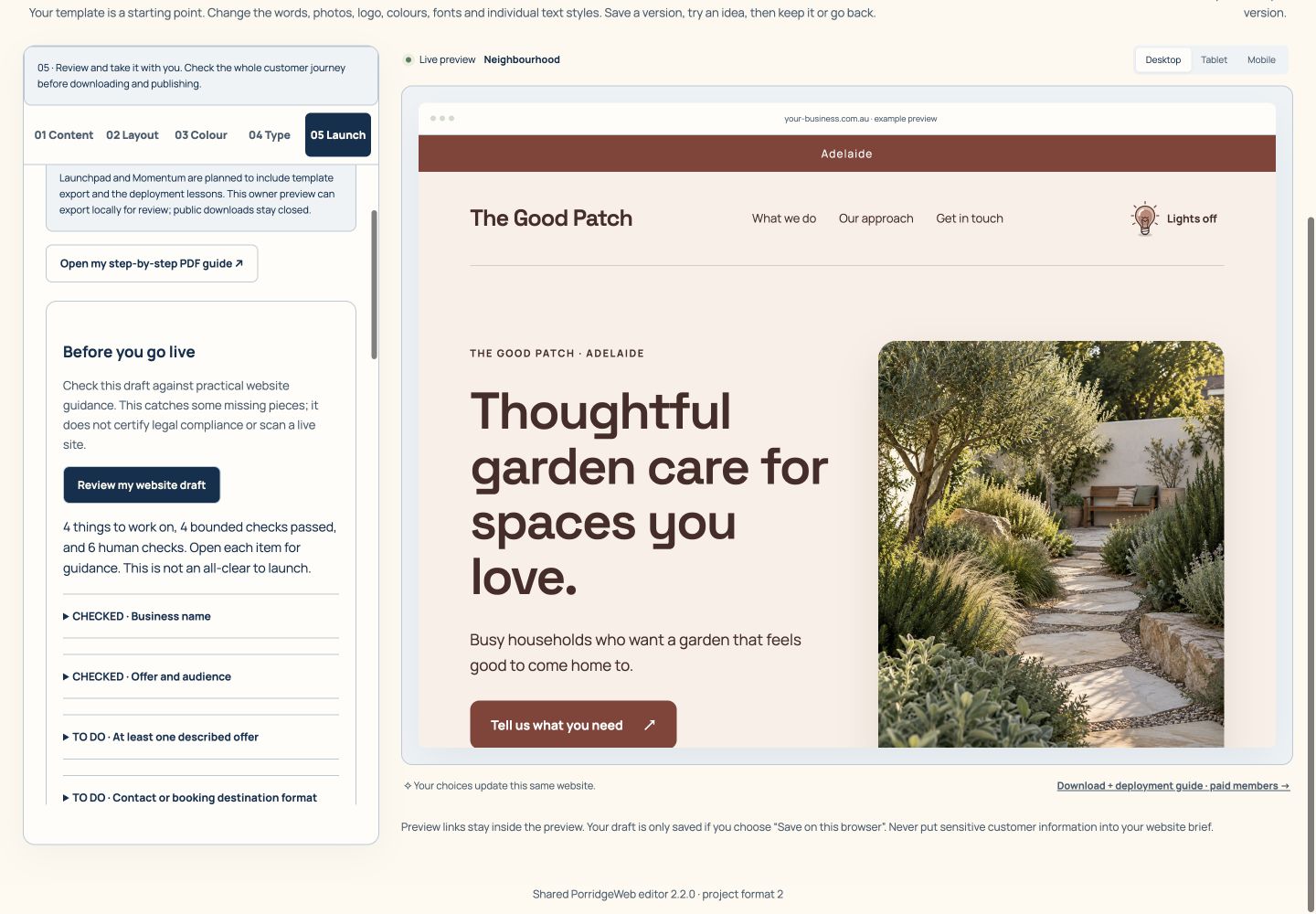
Review the journey, save a backup and download the static website ZIP. Follow the hosting guide to publish it separately.
Follow the download stepsWATCH · 2 MINUTES 24 SECONDS
See how choosing a design, making it yours and preparing the download fit together. Use the chapters to jump to the part you need.
Download the demonstration video · Download captions · Follow the numbered tool guides
Your website should help customers understand what you do, feel confident and take the next step. PorridgeWeb brings the planning, design tools and practical guidance together, so you can build at your own pace.
Step one. Find a look that fits. Browse the art directions, narrow the collection by style or business, and compare the previews. Try a different colour scheme before you decide. The free tools let you explore before choosing a paid plan.
Step two. Make it yours in the website studio. Change your words, colours and fonts beside the live preview. Add your logo and photographs. Check Desktop, Tablet and Phone views as you work, so your message stays clear on smaller screens.
Step three. Give your images a useful job. The member library helps you find illustrative images within your monthly allowance. Image Prep Studio lets you crop, adjust colours and prepare a WebP copy. Keep the original, and use real photographs when you are showing actual staff, work or products.
Step four. Add what your customers need. Use a gallery, service carousel or contact form to make the next action clearer. Pro adds product catalogues, label tools and extra planning worksheets. A demonstration basket is not a connected online shop checkout.
Step five. Check your work and keep a copy. Follow the numbered tutorials, run the launch review and download your static website files with the setup guidance. Drafts and save points stay in your browser, so download backups you want to keep.
Starter is nineteen Australian dollars a month. Porridge Plus is twenty-nine, and Pro is forty-nine, including GST. All are for one website. Hosting, domains and business email are separate. AI help, logo concepts and generated images use credits, with an estimate before you start.
Visit the About page to find every tool and its own guide. Compare the plans on Pricing, or begin with a free tool. PorridgeWeb. One useful step towards a website that feels like your business.
Watch more tool demonstrations · Open all numbered tutorials
FIND THE HELP YOU NEED
Each tool name opens its own step-by-step page. “Open the tool” takes you to the tool if your membership includes it; otherwise you can compare plans. Plan limits still apply. Planned capabilities are labelled and cannot be purchased as working features.
66 tools and resources
No matches yet. Try a shorter phrase or choose “Show all tools”.
Get a useful starting point before you spend money or commit to a design.
Turn your offer, audience and next step into a clearer message. A structured worksheet, with no AI request.
Check whether one text and background colour pair is readable. A useful check, not a whole-site accessibility audit.
Answer a few questions to find a starting layout suited to the way your business helps people.
Browse 57 complete art directions using 31 style, layout and business filters and a live matching count. Try six colour schemes or browse large desktop and phone previews with Previous and Next. No signup is needed to explore.
Explore starting styles for service businesses, shops, hospitality, consultants and more.
A practical starting guide. Downloads need a verified free account and use the allowance shown in your account.
Explore possible business models, useful questions and realistic next steps before building.
Understand where outside services can help. Their subscriptions, charges and terms are separate from PorridgeWeb.
Make your business easier to understand, with a layout and details that feel like you.
Shape your pages with words, images and useful components beside a live preview. Browse every design, follow guided setup or go straight to editing.
Apply a complete art direction across your site, a page or a block. Keep your content and choose whether to retain your colours, fonts and individual overrides.
Try palettes, fine-tune colours and check selected contrast combinations as your design changes.
Choose from your plan’s collection of 19, 29 or 49 font families. Fine-tune type by role and keep the supplied font licences with your website export.
Create an editable vector logo from the built-in symbols and your business name, or upload your own logo. This is not AI logo generation.
Give your logo a short entrance, with timing, colour, skip and reduced-motion options.
Create a rotating opening section with several designs, your own images, captions, links and accessible playback controls.
Choose a grid or browsable carousel for your services and offers, with motion and timing controls.
Add your own main photo, descriptive alternative text and captions; edit individual content blocks in the preview.
Check your website at different widths before you share it. Still test the published result on real devices.
Save progress on this browser after a short pause, use five undo steps during your visit, and keep three named versions plus eight safety restore points. Download private settings backups; cloud saving is not included.
Choose from 23 original light/globe/switch controls, see the actual icon before choosing, and set colours, an animated or still appearance, and an optional cord where supported.
Follow the numbered route and remaining count, or move to the Studio early with your completed facts. Choosing a design remains a separate action.
Choose a full-width or contained workspace, hide or show the tools sidebar, and use a searchable Tools & places menu. These editing preferences do not change the downloaded website.
Add a useful message near the opening, with an optional link. Keep it still, or choose movement with pause, keyboard and reduced-motion controls.
Add a clearly labelled button that opens extra information only when chosen. Close and Escape return focus; an expandable fallback works without JavaScript.
Add up to six mixed-ratio images in a grid, feature showcase or fanned cards, with larger previews. An optional scroll fan includes a manual button and still reduced-motion presentation.
Choose paired Australian watercolour or photographic scenes, fade an opening or closing image towards any edge, and adjust fade length and image position. The fade follows your page colour in light and dark appearances.
Add useful link panels beside supporting content, with individual titles, widths, sticky and collapsible options. Up to six links per side; sidebars stack on small screens.
Prepare your images, check the visitor journey and take your website files with you.
Choose from 122 original illustrative images: 20 business collections plus Australian landscapes, watercolours and ten photographic studies in 5:4. Preview, select up to 12 and download a ZIP with details and usage guidance. Existing library downloads use no AI credits. Your plan includes 5, 10 or 20 different library images per paid month.
Crop, adjust exposure, contrast and saturation, make a black-and-white or artistic colour version, or create a bounded 2× copy. Compare with the original and download locally; no AI credits are used.
Make browser and home-screen icons from your logo, preview them at small sizes and download installation notes.
Choose a layout and add fields such as text, email, choices and consent. Connect Netlify Forms or a supported external endpoint, then test delivery.
Enter your address manually or prepare Google address suggestions. Live suggestions need your own restricted Google Maps key and provider setup.
Flag missing details, sample content and selected readability issues, then download your action list. Human and regulatory checks remain essential.
Download your static website, assets, font licences and setup guidance. Hosting, working payments and booking systems need separate connections.
Follow website-building lessons and work through the choices behind a useful customer journey.
Use practical guidance on content, navigation, trust and the details that help visitors take their next step.
Work through content, permissions, contact details and handover questions before calling the job finished.
Review a website against the guide and record what needs attention. It is a guided review, not an automated compliance certificate.
Look up the website terms you encounter along the way, without falling down a jargon rabbit hole.
Explore a practical route for your type of business, from first decisions to launch.
Build batches of ten image prompts with quick choices for shape, lighting, feeling, composition and detail. Prompt building uses no AI credits.
Help customers understand a product range, with clearer details and consistent presentation.
Add, edit or remove products, prices, descriptions and variants; preview a mock shop and export its static files.
Add PNG, JPEG or WebP photos in any aspect ratio within the stated limits. Use adaptive, stacked or side-by-side cards, whole-image fit or an intentional crop.
Adjust branding, product names, vintages and colours. Download an illustrated SVG or preview a label on a realistic sample bottle.
Show a demonstration basket or configure supported external payment links. This does not provide order management, inventory or a connected checkout.
Turn scattered ideas into practical content, page and customer-action plans.
Bring your audience, offer, outcome and next action together in a downloadable worksheet.
Sketch the pages and sections a service business, shop or expert website needs.
Draft a page title and description and consider how they read together. Search engines may display different text.
Add campaign labels to a public URL so compatible analytics can distinguish your promotional traffic.
Plan answers to the questions that make customers pause before enquiring or buying.
Clarify what an image needs to communicate and prepare useful alternative text.
Join the dots between a button, its destination and what happens after the customer acts.
Record the evidence and permissions behind public claims and set a review date.
Keep useful ideas and design resources within reach, with their permissions explained.
Save notes locally with passphrase protection and export an encrypted backup. Keep your passphrase safe; we cannot recover it.
Explore 23 working SVG theme-control designs, the separate bronze coach artwork, and twelve matching interface icons with a sprite, helper and usage notes.
Inspect example assets before choosing a resource. This is a visual reference page; check the original licence and attribution requirements separately.
Find resource sources and licence guidance. Check each item’s own licence; membership does not override third-party conditions.
Shape a clearer brief for use with an AI service you choose. Building the prompt itself does not call AI.
Explore website options and the wider business decisions that sit around a website.
Learn where AI can help, what information to avoid sharing and what a person still needs to check. Reading does not use API credits.
Download twelve matching arrows and useful action icons, plus a sprite, small JavaScript helper, CSS and accessible usage notes.
Get focused AI help within your credits, and see clearly what is still being prepared.
Planned help turning a reviewed brief into page content. This capability is not active; current AI credits cover help questions, logo concepts and website images.
Turn your business brief into a fresh vector symbol with outlined lettering. Review the credit estimate first, then download SVG and transparent PNG files for your site. Check the concept and similar brands before adopting it.
Choose balanced, high or maximum quality and create one website image from your description. Review the maximum credit hold first; only measured usage is charged.
Ask a focused website question when the built-in guidance is not enough. Review the estimate, consent to sending the question and keep control of your credits.
The intended Hosted package adds one static website, HTTPS, domain connection and defined backup and support arrangements. Automatic provisioning is not connected yet.
Follow a numbered guide when you need to learn one specific task.
Read the guideWatch actual editing demonstrations before deciding whether the workflow suits you.
Read the guideUnderstand estimates, your balance, monthly allowances and optional top-ups before using AI.
Read the guideUnderstand the reforms, what is proposed and what website owners can prepare. This is general guidance, not legal advice.
Read the guideRecord what you know, what needs checking and your next actions using an original blank worksheet.
Read the guideUnderstand the proposed workflow and its limits. An automated assessment service is not available.
Read the guideCheck the official sources and review dates behind the guidance.
Read the guideSee how browser storage, account data, analytics and AI requests are handled.
Read the guideUnderstand our referral relationships before choosing an external service.
Read the guideCheck renewal, cancellation, licences, allowances and your rights before paying.
Read the guideTry free tools, take the template quiz and inspect public previews. Google sign-in creates access to your account; a paid subscription requires a separate Stripe checkout.
Use your included designs, fonts and images. Editing and eligible website downloads use no AI credits. AI help, logo concepts and generated images show an estimate before you start.
Projects and save points stay in your browser. Download backups. Website ZIPs need hosting and any form, booking or shop services connected separately.
Practical help, one thing at a time.
Start with the page’s instructions, save a copy of your work and try one change at a time. Our tool tour explains the main tools.
Prefer a person? Draft an email for help
Your email app opens a draft for you to review and send. Don’t include passwords, payment information or private customer records.