
FREE GUIDE · TOOL ACCESS BELOW
Image Studio
Turn a useful image idea into a clear prompt, then take it to your preferred image tool.
Building prompts uses no AI credits. Generating images is a separate action.
What to know before you start
Build batches of ten image prompts with quick choices for shape, lighting, feeling, composition and detail. Prompt building uses no AI credits.
6 numbered steps. Follow the guide below and check your result before publishing.
Each plan includes a selected design, font and image allowance. Previewing a tool does not change your subscription.
READ IT. TRY IT. MAKE IT YOURS.
One useful step at a time.
Keep this guide beside you while you work. Complete any passwords or private details in the tool, never in a tutorial.
STEP 1 OF 6
Choose your batch
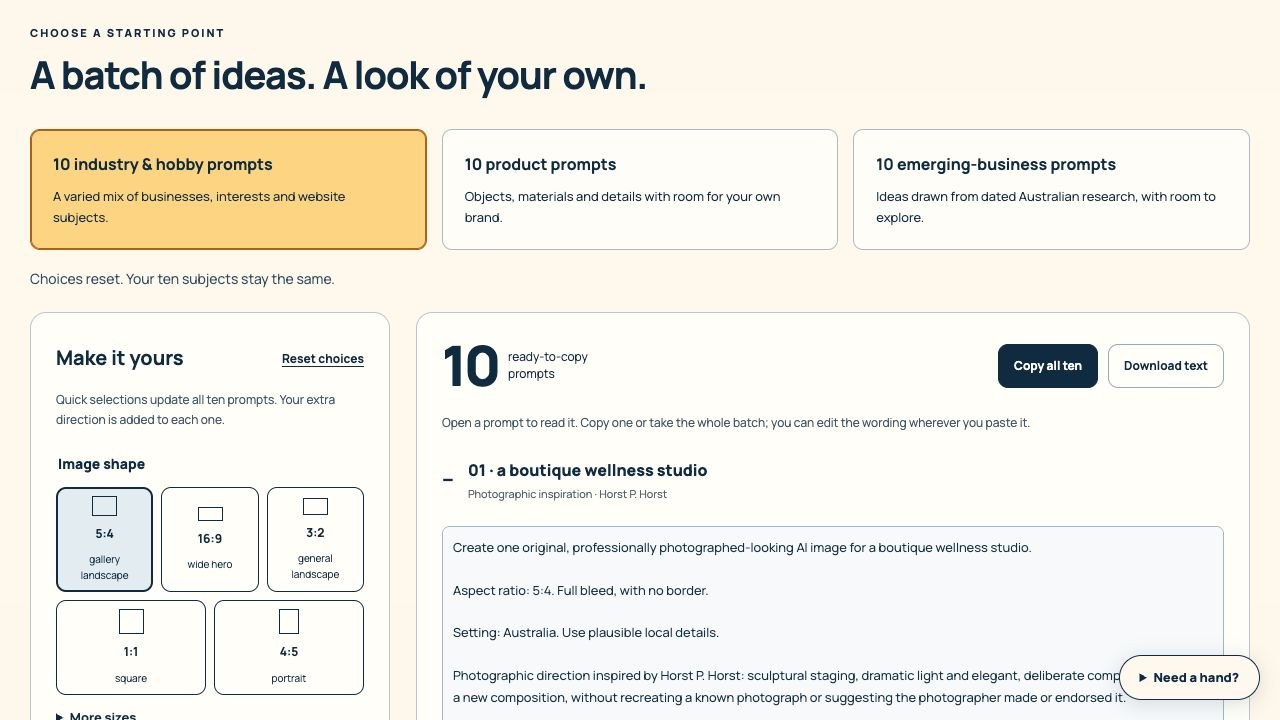
Open Image Studio from Website Studio, the tools menu or your image library. Choose 10 industry & hobby prompts, 10 product prompts or 10 emerging-business prompts. Each batch uses ten distinct photographic directions.
STEP 2 OF 6
Choose the shape and the look
Use 16:9 for a wide hero, 3:2 for general landscape photos, 5:4 for gallery cards, 1:1 for squares or 4:5 for portraits. More sizes includes 2:3 and 9:16. Choose lighting, colour and feeling; open Composition, camera & people for more control. Quick details add useful instructions immediately.
STEP 3 OF 6
Make the brief yours
Add public business details in Your extra direction. All selections update the ten prompts. You can leave the photographer’s name in as inspiration or remove it while keeping the described technique. New compositions are requested; no endorsement is claimed.
STEP 4 OF 6
Copy or keep the prompts
Open a prompt, choose Copy this prompt, or use Copy all ten and Download text. Edit the copied wording wherever you paste it. Remember this batch saves it only on this browser; Forget saved batch removes that stored copy.
STEP 5 OF 6
Generate deliberately
Creating prompts makes no AI request. Submit a prompt to your chosen image tool only when ready, and review that tool’s price. PorridgeWeb’s AI image generator has its own available shapes and credit estimate; it may not support every requested ratio. Use Image Prep to make the final crop.
STEP 6 OF 6
Choose an existing image instead
The ten original photographic studies are in your image library. Select up to 12 pictures, read the illustrative-image note and download a ZIP. Each new study is 1400 × 1120 pixels (5:4), with its prompt and inspiration in IMAGE-DETAILS.json. Check desktop, tablet and phone crops before publishing.
HOW YOU KNOW IT WORKED
Check your result.
The copied prompt contains your selected shape, subject and direction. Your downloaded image is appropriate for the website and does not imply fictional work, products or people are real.
If it doesn’t feel right yet.
If Copy is unavailable, use Select text or Download text. If local saving is unavailable, download the batch before leaving. Emerging-business themes show their research date and sources; they are not a live trend feed or a promise of demand.
Ask for a helping hand ↗Include the step and what happened. Leave passwords, keys and private customer information out.
Saved only on this browser. It is a reading reminder, not proof of completion or compliance.
Keep going at your own pace.
← All tutorialsGuide checked against the working tools on 15 October 2026. External service screens and requirements may change.