PorridgeWeb

Porridge+ and above · 4 CLEAR STEPS

Workspace width and tools menu

Choose an editing space that fits the way you work.

Reading this guide is free. Opening the tool needs the membership shown above. Review the monthly price before checkout.
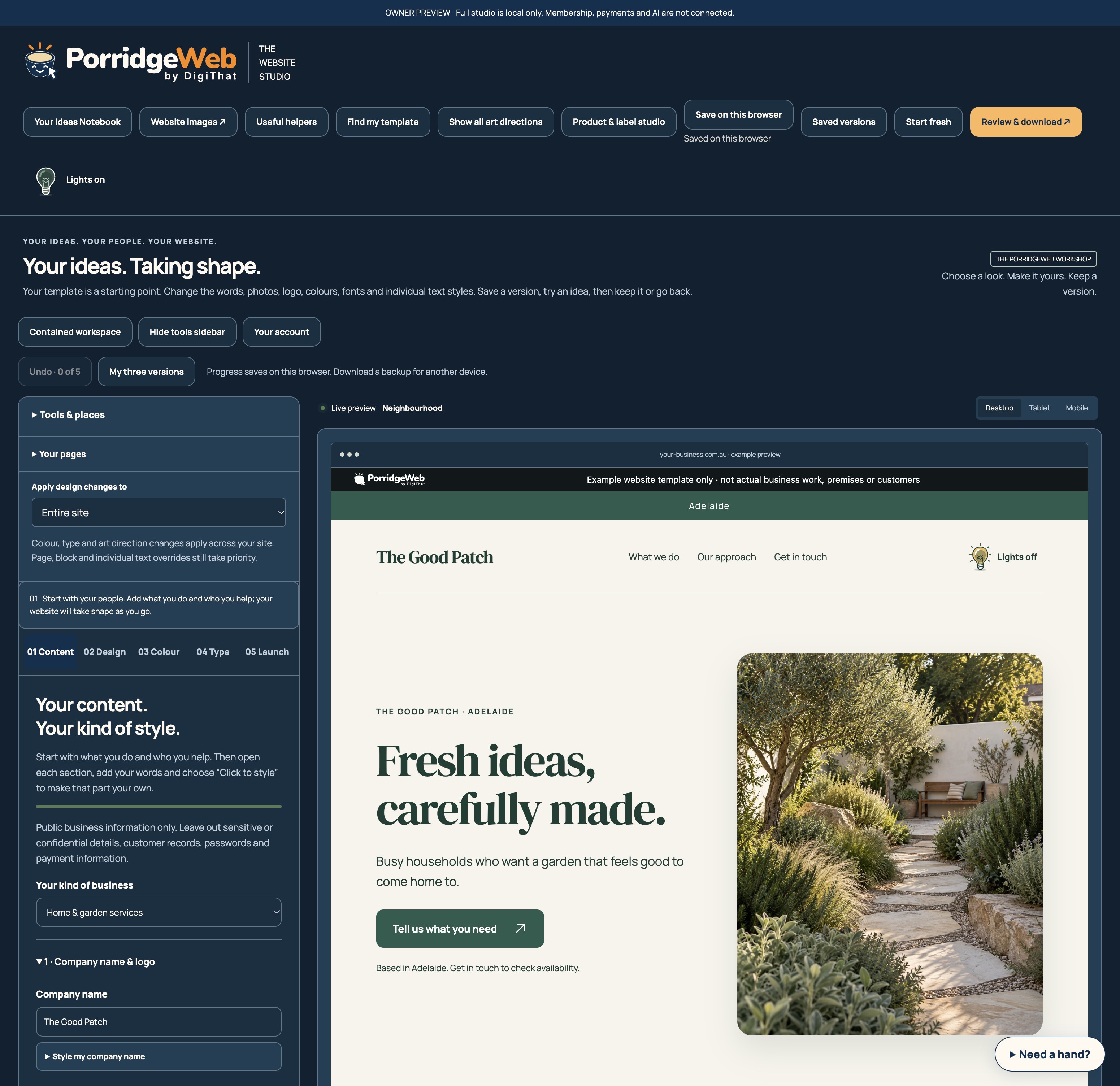
Studio controls for workspace width, the tools menu and saved progress
A local development capture from 14 October 2026 with fictional example content. Toolbar details reflect the testing stage shown; follow the current written steps.

READ IT. TRY IT. MAKE IT YOURS.

One useful step at a time.

Keep this guide beside you while you work. Complete any passwords or private details in the tool, never in a tutorial.

  1. STEP 1 OF 4

    Find your tools

    Use Tools & places above the left-hand editing controls. Search for a tool, or choose a Studio shortcut. Tool links open their actual member areas; access is still checked.

  2. STEP 2 OF 4

    Choose the workspace width

    Select Full-width workspace to use more of your display. Select Contained workspace to return. This changes the editor, not your customers’ page layout.

  3. STEP 3 OF 4

    Make room for the preview

    Choose Hide tools sidebar when you want to see more of your draft. Show tools sidebar brings the controls back; a tool shortcut also opens them.

  4. STEP 4 OF 4

    Keep your progress and move on

    Check the automatic-save status before opening another tool. If saving cannot be confirmed, the Studio asks you to download settings first. Workspace width/sidebar preferences remain on this browser.

HOW YOU KNOW IT WORKED

Check your result.

The tools remain reachable, the preview is usable, and changing the workspace does not change your website export.

If it doesn’t feel right yet.

Use Show tools sidebar or Tools & places to recover the controls. If browser storage is unavailable, export a settings backup before leaving.

Ask for a helping hand ↗

Include the step and what happened. Leave passwords, keys and private customer information out.

Keep going at your own pace.

← All tutorials

Guide checked against the working tools on 14 October 2026. External service screens and requirements may change.

Need a hand?

Let’s find your next step.

Practical help, one thing at a time.

Start with the page’s instructions, save a copy of your work and try one change at a time. Our tool tour explains the main tools.

Prefer a person? Draft an email for help
Your email app opens a draft for you to review and send. Don’t include passwords, payment information or private customer records.

EXPLORE FIRST. CHOOSE WHEN YOU’RE READY.

A little more room
for your ideas.

This is a member feature. Keep exploring, try the free tools, or see which plan could suit your next step.

Browse previews and use the free browser tools now. Guide downloads require a verified free account, within the allowance and availability shown in your account. Choosing a plan takes you to your account. Payment requires a separate, explicit checkout step.

A USEFUL START

Porridge Free

A$0 / free tier

A useful place to start, with room to explore.

  • Message planner and colour contrast checker
  • Template finder and the complete art direction previews
  • Tool demonstrations and public website guidance

Free browser tools now. Guide downloads need a verified free account; allowance and availability apply.

Use the free tools

MAKE IT YOURS

Porridge+

A$49 / month

The essentials to build, polish and take your website with you.

  • Website Studio, the complete art direction collection and flexible content
  • Colours, fonts, SVG logos and first-visit logo reveals
  • Hero and offer carousels, plus contact form builder

Monthly membership · cancel renewal online.

Choose Porridge+

CREATE + HOST

Porridge Hosted

A$129Coming
soon
/ month

The Pro workshop, with a home for one website.

  • Everything proposed for Porridge Pro
  • Managed hosting for one static business website
  • HTTPS and connection of your own domain

Hosting is not available to buy yet.

See plan details
Already have an account? Sign inCompare all inclusions

Prices are in Australian dollars. Porridge+ and Pro renew monthly. AI help and images use included monthly credits: 2,500 on Porridge+ and 5,000 on Pro. Hosting is not included. Read the membership terms before checkout.